
Vendor relationship note: Solstice Ornament Studio is a Trusted Expert product, made by me. This is a product overview, not an independent review, and it does not report customer results.
Christmas ornaments are one of the few products people actively look for every year, and 3D printing has made them something people can design and make themselves. The hard part for most people is the design step: CAD software is slow to learn, and downloading someone else’s file means everyone’s tree looks the same.
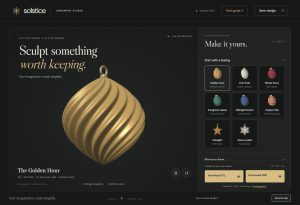
Solstice is a browser app that handles that step. You pick a starting design, adjust it, and export a file that is ready for a slicer and a 3D printer.
What Solstice does
- Eight starting designs across round, drop and onion baubles, a fuller 3D star and seeded pierced snowflakes.
- Adjustable shapes: pattern, size, colour and minimum wall thickness, depending on the design.
- STL and 3MF export for your slicer. 3MF carries colour hints; STL has no colour.
- Saved designs as a small file you can reopen and keep working on.
- A built-in printing guide covering importing, hollow walls, orientation and support starting points.
It runs as a single HTML file in a desktop browser and works offline. There is nothing to install.
The white-label edition
Solstice is also available as a white-label package for people who want to sell their own branded ornament designer. A browser-based rebrander takes your product name, logo, colours, tagline and support email, previews the result as you type, and builds one finished HTML file. That file is the product you sell.
You can create unlimited branded editions for your own paid sales to end users, set your own price and keep the revenue, with no royalties. The licence does not allow giving the app away, passing on the rebrander or resale rights, or making editions for other resellers, and you support your own customers.
Who it is for
- 3D-printing hobbyists who want their own ornament designs without learning CAD.
- Sellers with an audience (an email list, a maker community or a craft shop) who want a seasonal product of their own.
It is not for you if you need names, dates or lettering on ornaments (the app does not add text to models), or if you want editable source code.
Good to know
Physical ornaments need a 3D printer or print service, suitable material and a slicer. There are real test prints and software geometry checks, but not every shape has been printed on every printer, so the guide recommends checking each export in your slicer before printing.
See the Solstice White Label page for screenshots, a short demo video, the full licence and current pricing.